
Sora AI Videos Are Taking Over The Internet—Here’s How To Tell Them Apart
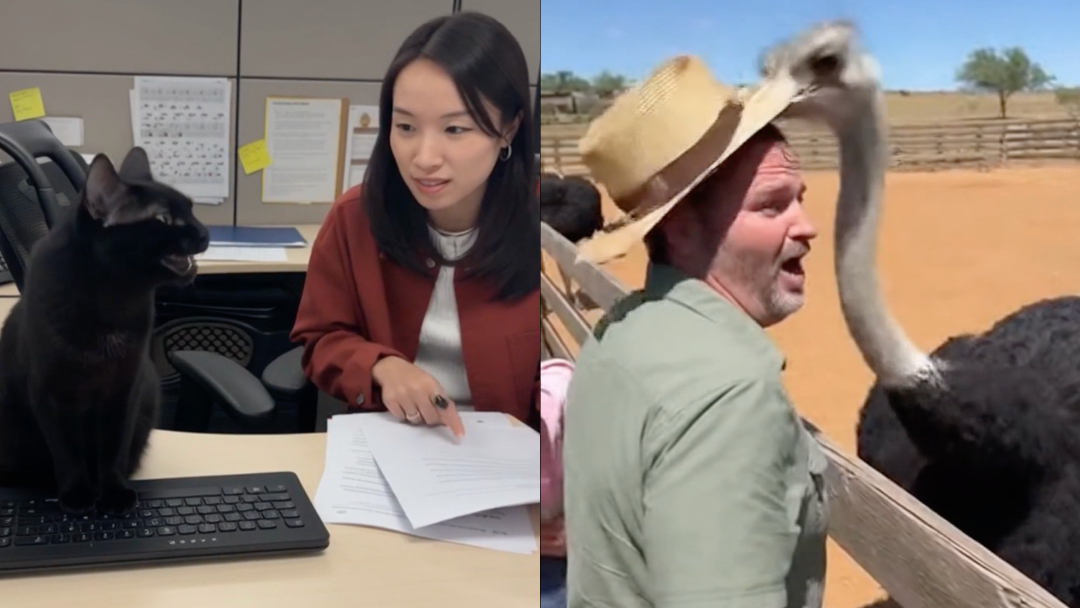
Video screenshots via OpenAI [1][2]
Since Sora 2’s worldwide debut, social media has been flooded with unnervingly lifelike clips built to engross, loop, and spread. If a video seems too outlandish to be true, you might be staring at its handiwork. But OpenAI’s text-to-video system has gotten good enough that casual tells don’t always show up on first watch.
The good news is that there are still some ways to zoom into their provenance before you share. The not-so-good news: no single method is foolproof.
Here are some subtle giveaways that may help you tell real footage from the growingly rampant crop of synthetic sorcery.
1. AI is a feelings factory
@dead_000010101 sora 2 invite code ai Sora 2 ai generated videos sora #ai #нейроÑеть #ии #sora2invitecode #sora2
♬ Funny - Gold-Tiger
AI videos are often designed to go viral. Emotion is engagement. A huge bulk of this content features cute animals and babies, with many of the characters seemingly talking back to adult humans or doing things that seem physically or morally improbable. If a clip provokes shock or awe with no credible source, you may want to pause before reposting.
View this post on Instagram
2. Texture troubles
@ms.world00 The Sora Video Compilation 😳 #scary #sora #sora2 #catai #aianimal
♬ Occult/Mystery/Horror Suspense(844669) - ï½ï½
Currently, Sora 2 has difficulty hiding compression quirks. Watch for grainy or smeared patches where the model may have struggled, such as smudged faces and blurry backgrounds. A lot of the outputs appear like low-resolution footage from the early days of YouTube, bodycam cameras, or even from your Ring camera.
3. Lighting lies and reflection red flags
View this post on Instagram
Does a shadow fall the wrong way? Does a mirror fail to reflect the subject accurately? Inconsistent lighting direction or distorted reflections often hint at a generated scene. The same goes for signage—AI text tends to warp, repeat letters, or form unreadable words.
@airkiller Sora 2 is OpenAI's latest and significantly advanced text-to-video AI model, launched September 30, 2025, which generates longer, more physically realistic, and controllable videos with synchronized dialogue and sound effects directly from text prompts. Key improvements over the original Sora include enhanced physics simulation for complex actions, improved temporal consistency to reduce flickering, the ability to generate synchronized audio including dialogue and soundscapes, and a new app with an invite-only rollout in the US and Canada, with plans for wider availability. #viral #fyp #blowthisup #sora #xyzbca
♬ original sound - ð“ð“²ð“»ð“´ð“²ð“µð“µð“®ð“»
4. Verify the source, not just the scene
The strongest test isn’t in pixels but in provenance. OpenAI embeds C2PA metadata—cryptographic “content credentials”—into its outputs. These digital watermarks record who made the video and how. You can drag and drop clips into the Content Credentials Verify tool or use browser extensions from CAI partners to check for valid signatures. A verified manifest points to authenticity, though missing data doesn’t automatically mean fakery.
5. When in doubt, think like a forensic editor
When metadata isn’t available, go old-school. Scrub frame-by-frame, check for continuity errors, unnatural edges, and reflections that don’t line up. Look beyond the subject to background details—extras, signs, or shadows—that might break the illusion.
As detection tech evolves, so will the realism of fake videos. For now, skepticism remains the sharpest lens you can use.
[via TechRadar and Axios, video screenshots via OpenAI (1)(2)]


